> For the complete documentation index, see [llms.txt](https://docs.verticalstudio.ai/llms.txt). Markdown versions of documentation pages are available by appending `.md` to page URLs; this page is available as [Markdown](https://docs.verticalstudio.ai/vertical-products/motion/motion-director-agent.md).
# Motion Director Agent
Not a tool. An expert.
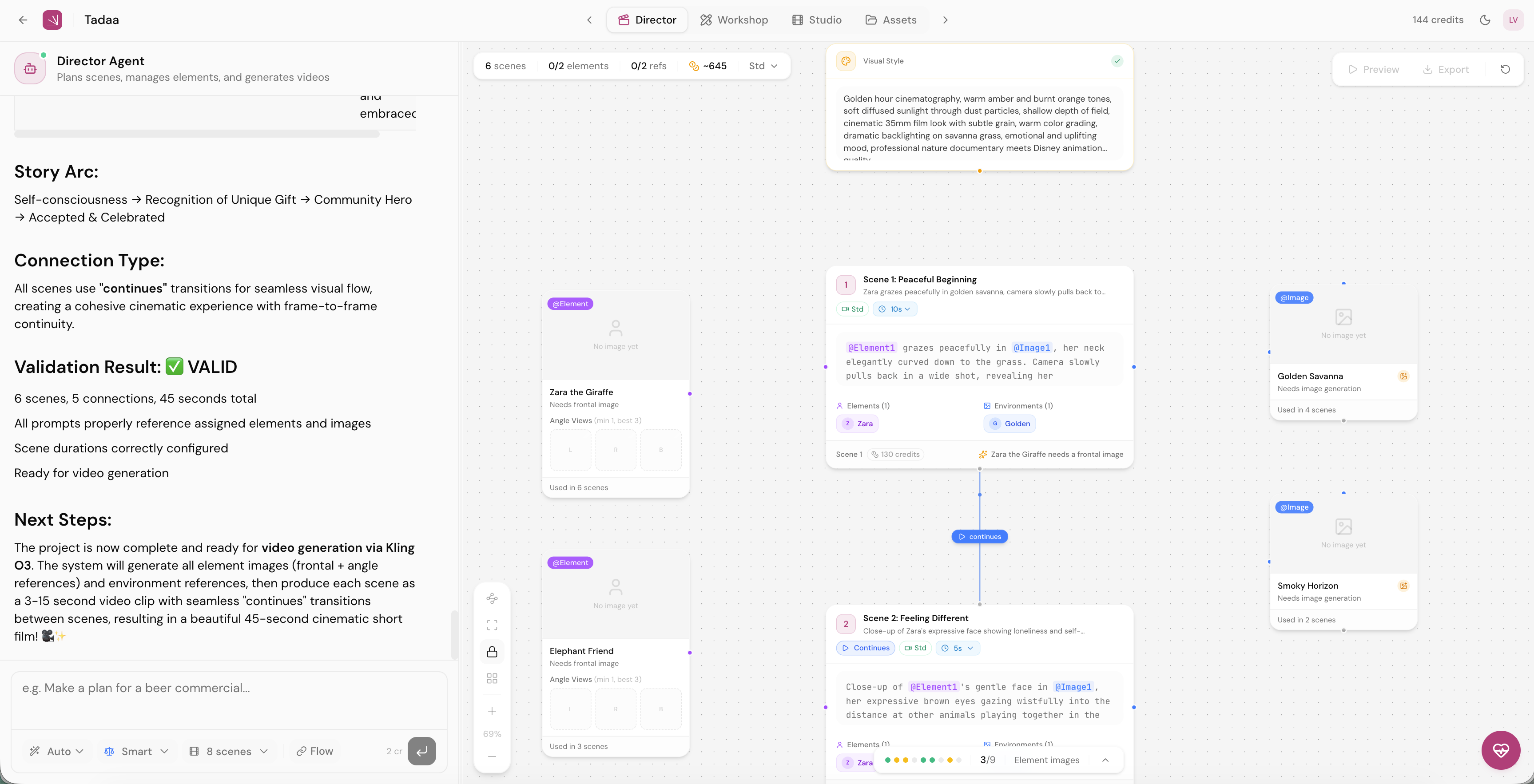
The **Director Agent** is the core of Vertical Motion. It's a specialized AI director trained with deep knowledge of video generation models — their capabilities, limitations, quirks, and optimal settings.
Think of it as a professional film director who has also memorized the entire technical manual of every camera in the room. You describe your vision, they handle every creative and technical decision.
***
### What makes it different
Most AI video tools are thin wrappers: your prompt goes in, a video comes out. The Director Agent goes much deeper.
| What the Director knows | Why it matters |
| --------------------------------------------------- | --------------------------------------------- |
| Which prompts succeed and which fail for each model | Fewer wasted generations, less burned credits |
| Optimal durations for each scene type | No invalid settings, better pacing |
| Camera movements the model can handle | Avoids artifacts and "AI slop" |
| When to use new scenes vs. continuations | Proper cinematic structure |
| How many element angles are needed and why | Reliable character consistency |
| Which prompt techniques mask AI limitations | Higher quality output |
> The Director Agent doesn't just generate video. It **directs** video — the same way a cinematographer directs a camera.
***
### Three modes
The Director Agent automatically switches between three modes based on what you need. You don't have to choose — it picks the right one for you.
| Mode | When it activates | What it does |
| ----------- | ---------------------------------------- | ---------------------------------------------------------------------- |
| **Ask** | You're brainstorming or asking questions | Explores ideas, gives guidance — no actions taken |
| **Planner** | You want to plan a video before building | Creates a structured plan with scenes, elements, and pacing |
| **Builder** | You're ready to create | Executes the full pipeline — elements, references, scenes, connections |
**Typical flow:**
1. You describe your video idea → Director enters **Planner** mode
2. Director presents a structured plan → You say "do it"
3. Director switches to **Builder** mode → Creates everything automatically
***
### What the Director creates for you
When you describe a video idea, the Director Agent handles the entire production pipeline:
#### 1. Style
Sets a **global style prompt** — the visual DNA for your entire project. Color palette, lighting mood, animation style, atmosphere. Every scene inherits this automatically.
#### 2. Elements
Creates **persistent visual assets** for anything that must stay consistent: characters, props, products. Each element is generated with multiple angle views so the video model can maintain identity across scenes.
#### 3. References
Creates **environment and style images** that define how scenes look. Locations, lighting, mood — all locked in and reusable.
#### 4. Scenes
Plans and creates your **video clips** with proper structure: which elements appear, which references define the look, what happens, how long it lasts.
#### 5. Connections
Defines how scenes **connect to each other**: clean cuts (new scenes) or smooth continuations. The Director chooses based on what works best for the narrative.
***
### Model-aware prompting
The Director Agent knows things about video models that most users never learn. It applies this knowledge automatically to every prompt it writes.
**Techniques the Director uses:**
* **Camera shake instead of fast motion** — handheld micro-jitter masks AI artifacts
* **Imply motion, don't show it** — before/after cuts instead of complex movement
* **Slow motion for complex actions** — more forgiving for the model
* **Anchor with stillness** — one stable subject with background blur
* **Micro-movements over macro** — eyes, hands, breath instead of running
* **Lighting hides imperfections** — contrast and shadows cover artifacts
* **Cut before it breaks** — shorter scenes, cleaner results
> You don't need to learn these tricks. The Director applies them automatically.
***
### State management
The Director Agent maintains a **Project Brief** — a living snapshot of your project's current state: intent, style, elements, references, scenes, and connections.
This means:
* It never creates **duplicate** elements or references
* It always knows what's **already built** before deciding what's next
* Every iteration starts **aligned** with your project's current state
* You can pick up where you left off across conversations
After every action, the Director verifies its own work against a checklist: correct slots, valid durations, proper connections, style consistency. If something's off, it fixes it before handing back to you.
---
# Agent Instructions
This documentation is published with GitBook. GitBook is the documentation platform designed so that both humans and AI agents can read, navigate, and reason over technical content effectively. Learn more at gitbook.com.
## Querying This Documentation
If you need additional information that is not directly available in this page, you can query the documentation by asking a question.
Perform an HTTP GET request on the following URL with the `ask` and `goal` query parameters:
```
GET https://docs.verticalstudio.ai/vertical-products/motion/motion-director-agent.md?ask=&goal=
```
`ask` is the immediate question: it should be specific, self-contained, and written in natural language.
`goal` is what the user is ultimately trying to achieve, the reason they need the answer. Sharing it helps GitBook give you a better, more relevant answer. A goal is most helpful when it describes the outcome the user wants rather than restating the question. For example, with `ask=how do I create an API token`, a goal like `automate deployments from our CI pipeline` lets GitBook tailor the answer to that use case.
The response will contain a direct answer to the question and relevant excerpts and sources from the documentation.
Use this mechanism when the answer is not explicitly present in the current page, you need clarification or additional context, or you want to retrieve related documentation sections.