> For the complete documentation index, see [llms.txt](https://docs.verticalstudio.ai/llms.txt). Markdown versions of documentation pages are available by appending `.md` to page URLs; this page is available as [Markdown](https://docs.verticalstudio.ai/vertical-products/motion/motion-director-agent/preview-mode.md).
# Preview Mode
See what you'll get before you spend a single credit.
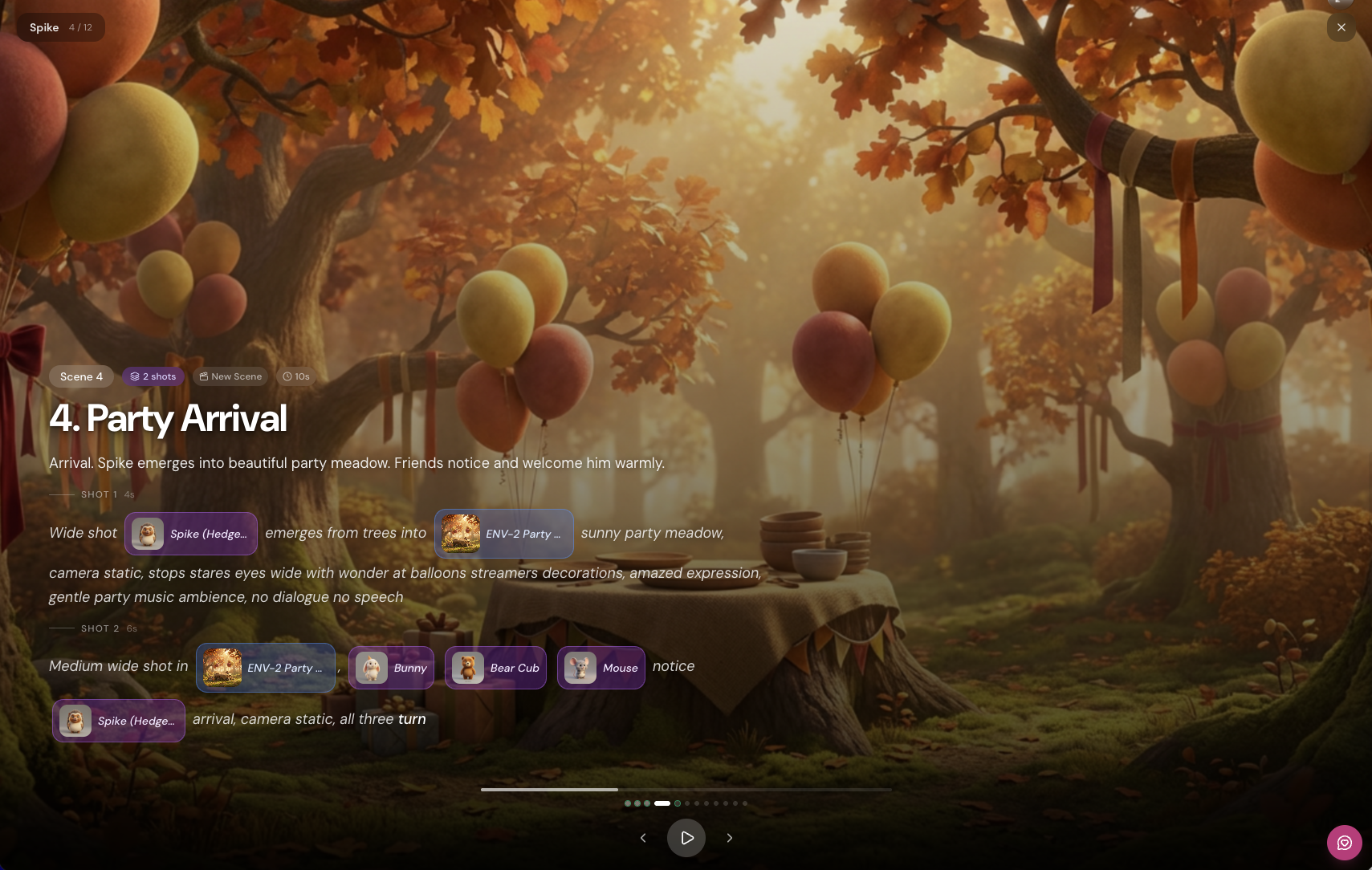
After the AI Director plans your video, **Preview mode** shows you exactly what each scene will look like — before you generate anything.
***
### What you see
Each scene displays:
* **Scene title and description** — what happens in this scene
* **Shot breakdown** — individual shots within the scene, with duration
* **Element tags** — which characters/props appear (with thumbnail)
* **Reference tags** — which environment is used (with thumbnail)
* **Connection type** — new scene or continues from previous
* **Prompt text** — the actual prompt that will be sent to the model
***
### Why it matters
AI video generation costs credits. Preview lets you:
* **Catch issues before generating** — wrong character, missing element, bad pacing
* **Understand the Director's plan** — see exactly how your idea was interpreted
* **Make adjustments** — change scenes, swap elements, adjust timing
* **Approve with confidence** — know what you're getting before you commit
> No more burning credits on scenes that aren't what you wanted.
***
### How to use it
1. **AI Director creates your plan** → scenes appear in Preview
2. **Review each scene** — check prompts, elements, timing
3. **Adjust if needed** — tell the Director what to change
4. **Generate** — once you're happy, generate all scenes
Preview is the checkpoint between planning and generating. Use it.
---
# Agent Instructions
This documentation is published with GitBook. GitBook is the documentation platform designed so that both humans and AI agents can read, navigate, and reason over technical content effectively. Learn more at gitbook.com.
## Querying This Documentation
If you need additional information that is not directly available in this page, you can query the documentation dynamically by asking a question.
Perform an HTTP GET request on the current page URL with the `ask` query parameter, and the optional `goal` query parameter:
```
GET https://docs.verticalstudio.ai/vertical-products/motion/motion-director-agent/preview-mode.md?ask=&goal=
```
`ask` is the immediate question: it should be specific, self-contained, and written in natural language.
`goal` is optional and describes the broader end goal you are ultimately trying to accomplish on behalf of the user. GitBook uses it to tailor the answer towards what is most useful for that goal.
The response will contain a direct answer to the question and relevant excerpts and sources from the documentation.
Use this mechanism when the answer is not explicitly present in the current page, you need clarification or additional context, or you want to retrieve related documentation sections.